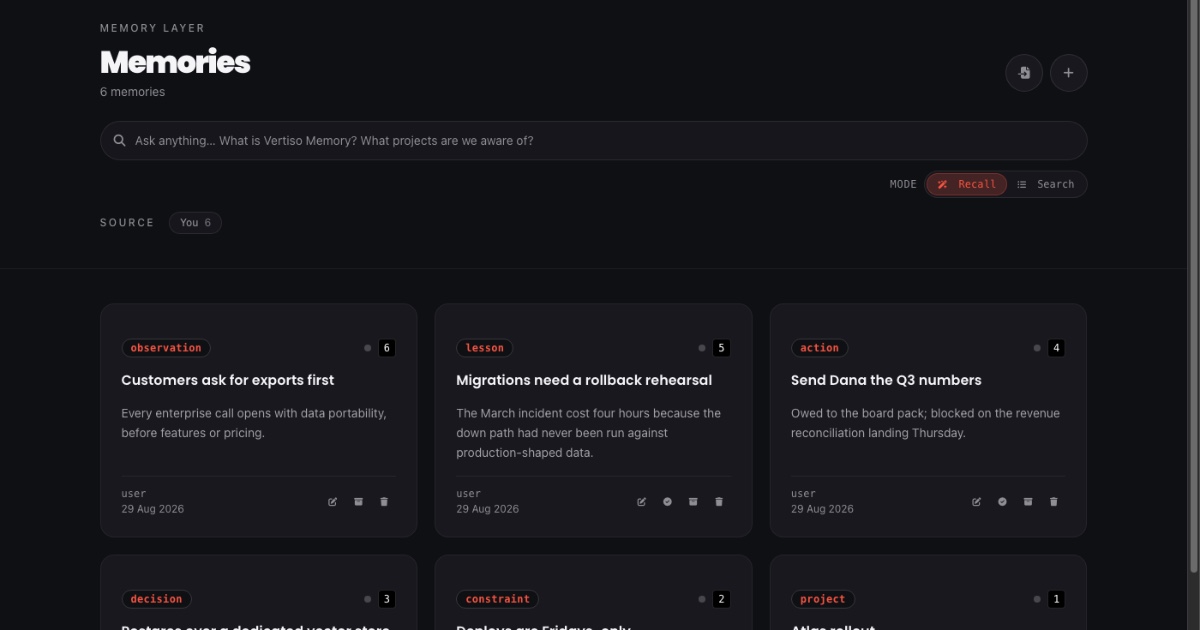
Most people meet Vertiso Memory through an agent. You connect a tool, it starts remembering things, and the memory works — quietly, in the background, in whatever client you happen to be using.
Which means there is a surprise still waiting for most people: a whole app on the other side of that memory, and every bit of it is yours.
There is a web app at memory.vertiso.ai. Sign in and everything your agents have written for you is laid out end to end — every memory, every fact drawn from it, every tag, every link between them. It sits behind your login, scoped to your account: private by default, visible to no one else. Sharing is coming, and when it lands it will be something you switch on for a specific memory — never a default. You can read it, correct it, delete it, or ask it a question without an agent in the room at all.
If your memory is going to be yours, you need somewhere to stand and look at it. Here is the tour.
The list: everything, typed
Sign in and go to Memories. Every memory you have is there, newest first, one card each.
The first thing you will notice is that the cards are not all the same
kind of thing. Each one carries a type — project, decision,
constraint, action, lesson, observation, event, intent —
because when you told your agent something, we read it and worked out
what kind of thing you said. A decision is stored as a decision, with
its rationale. A constraint is a rule you want followed. An action is
something you committed to, and it can be marked done right from the
card.
Under each title is a one-line summary in italics. That is our rendering, not your words — the label is deliberate, and it holds everywhere in the product.
Across the top is a single box that does two different jobs. In Search mode it finds records. In Recall mode it answers questions. Which brings us to the part people find surprising.
Recall, without an agent
Type a real question — "what did we decide about the rollout?" — and switch the mode to Recall.
You get what your agents get: a synthesized answer, a confidence rating, an explicit note about what was missing, and underneath it, the actual memories the answer was built from. Click any of them to read the original.
This is the same retrieval path your agents use, rendered for a human instead of a model. It is genuinely useful on its own — but the reason it is here is trust. When an agent tells you "your memory says X," you should be able to check, in one place, without taking anyone's word for it.
The detail page: our take, and your words
Open any memory and the page splits in two.
At the top: Vertiso Memory's take — the summary we wrote. Below it: Body — what you actually said, unedited. Two panels, clearly labeled, never blended. Summaries are for finding things; your verbatim is the record, and you should always be able to see which is which.
Down the right side is where it gets interesting:
- Tags, with counts —
project:atlas,person:dana,topic:deploys— applied automatically, editable by you. - Related memories, with the relationship named and how many times it was found. This is your knowledge graph, showing its work.
- Supporting observations — the individual facts we pulled out of this one memory, each its own clickable record.
That last one is the part nobody expects. One paragraph you typed in a chat window is not stored as one blob. It is broken into the separate claims it contains, and each of those is independently searchable, independently correctable, and independently linked.
Down to the fact
Click a supporting observation and you land on the fact itself.
It has its own summary, and beneath it, in quotes, the verbatim source — the exact span of what you wrote that this fact came from. Attribution, subject, and the date it was recorded. Its own tags, each showing where it came from and how confident we were: a tag you applied looks different from one a model suggested at 0.7.
And there is a drawer marked Extracted data. Open it and you see the typed fields — a project's status and owner, an action's due date, a constraint's importance. The structured record, exactly as stored. No inspector, no API call, no support ticket.
Correcting things
You can edit any memory, from the card or the detail page. You can add a comment — a note, a correction, or feedback — attached to the record rather than buried in a chat log somewhere. You can archive what is finished and delete what should never have been kept.
Corrections matter more than they sound. When you fix a fact, recall starts preferring the corrected version and says what it replaced. Your edits do not just sit there looking tidy; they change what your agents are told tomorrow.
And in Settings you can export the whole thing — every memory, every original file you uploaded — or delete your account and take it all with you.
Why it exists
The pitch for Vertiso Memory is that your memory belongs to you rather than to whichever AI vendor you used this afternoon. Belonging to you means two things at once: nobody reads it unless you say so, and you never have to take our word for what is in it. The first is table stakes. The second is why this app exists — the claim is only worth something if you can see the memory, check it, fix it, and walk out with it.
So: sign in and look. Open your busiest memory and read what we made of it. Ask it something in Recall and see whether the answer holds up. If something is wrong, fix it — and watch your next session get it right.
It is your memory. It should not be a black box, even ours.